Building a farm8 min read
iPhone Farm vs Android Farm: Which One to Build
Written by Petr Kynčl
An iPhone farm and an Android farm look the same from across the room: shelves of phones, a tangle of cables, screens lighting up on their own. Underneath they are very different machines, and the difference decides how much the farm costs, how many phones one person can keep running, and whether it can run unattended at all.
The short version: Android is the default for a phone farm, and an iPhone farm makes sense only when the job itself requires iOS. The rest of this article explains why, and what each one takes to build.
What "automating a phone" means on each platform
A phone farm is only useful if software can operate the apps on every phone without a person tapping each one. How that software reaches the apps is where the two platforms split.
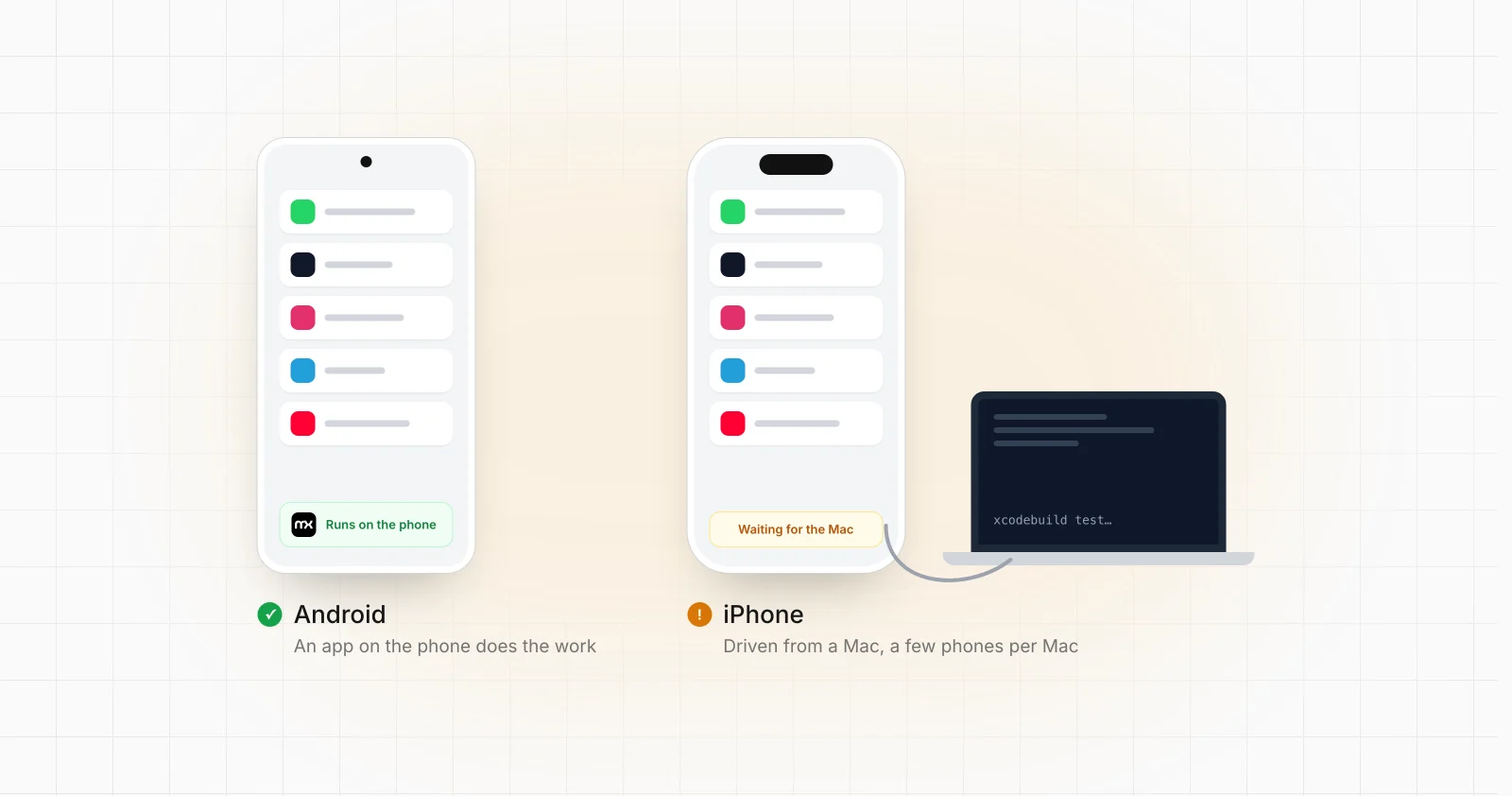
On Android, an app on the phone can operate other apps. Android has an Accessibility API: an app the user enables as an accessibility service can read what is on the screen, as a tree of buttons, fields and labels, and perform taps, typing and swipes in any other app. It is the interface screen readers are built on, and it is how an on-device agent like the MationX Client works. Nothing has to be plugged in, nothing has to be rooted, and the phone keeps working when it is alone on a shelf. The trade-offs between this and the other Android options are covered in Accessibility Service vs ADB vs UIAutomator vs Appium.
On iOS, an app cannot operate other apps. Every iOS app runs in its own sandbox, and Apple does not give third-party apps an equivalent of Android's accessibility service. Shortcuts can chain actions that apps choose to expose, but it cannot tap through an arbitrary app's screens. To drive another app on an iPhone, the automation has to come from outside the phone.
How iPhones are automated in practice
The standard route for automating iPhones is Apple's UI testing framework, XCUITest, usually through WebDriverAgent and Appium. It is built for testing apps, and running a farm on it means inheriting the constraints of a test lab:
- A Mac in the loop. WebDriverAgent is built and installed with Xcode, which runs only on macOS. Each iPhone talks to a Mac, over USB or the local network, while it is being automated. Engineering teams that run iPhone device labs describe pools of iPhones attached to clusters of Mac minis, with only a handful of phones per Mac.
- Code signing. WebDriverAgent has to be signed with an Apple developer identity and installed on each phone with a provisioning profile. A free Apple ID gives profiles that expire after seven days; the paid Apple Developer Program, at $99 a year, gives profiles that last a year. When a profile expires, the agent stops launching until it is reinstalled.
- Fragility. Real-device sessions drop, the agent sometimes has to be restarted, and Appium's own documentation notes that after repeated failures a device can stop accepting connections until it is rebooted. On a test bench someone notices. On a farm running overnight, nobody does.
- Updates on both sides. An iOS update, an Xcode update or a WebDriverAgent update can each break the setup, and they have to stay compatible with each other.
The other route is jailbreaking, which removes iOS restrictions so tools can run on the phone itself. It is the only way to get something close to Android's on-device automation, but public jailbreaks typically lag behind current iOS versions, a phone that updates loses it, and a jailbroken device is easier for apps to detect. It is not a foundation to build a business on.
Hardware and cost
Phones. Usable second-hand Android phones are among the cheapest computers you can buy, and the choice of models is enormous. iPhones hold their value, so even several generations old they cost more per phone, and the oldest ones stop receiving the iOS versions current apps require.
Box phones are Android only. A box phone farm packs about twenty Android phone boards, without screens or batteries, into one powered and cooled chassis. There is no iPhone equivalent, so an iPhone farm is always a shelf of complete phones, each with its own screen, battery and cable. See box phone farms for how they work.
Cloud phones are Android. Renting phones by the month in a data centre is a real option for Android, and the same accessibility-based flows run on them as on your own hardware (cloud phone automation). Virtual iOS devices exist, but they are built for security research and app testing, not for running ordinary apps at farm scale.
The Macs. An iPhone farm needs Macs on top of the phones, plus the time of someone who keeps Xcode, signing and the agents working.
To put real numbers on your own phones, box phones and cloud phones, the phone farm cost calculator works through each one with current list prices.
Running it every day
The cost that decides most farms is not the hardware. It is the hours spent keeping it running.
On Android, the agent lives on the phone. It starts again after a restart, keeps working when the network drops for a minute, and reports every step back to wherever the farm is managed. A phone that misbehaves is visible from a dashboard, and most fixes are a change to the flow rather than a visit to the shelf.
On iPhones, every phone depends on a live connection to a Mac, a valid signing profile and a running agent. Any of the three can stop without the phone itself doing anything wrong, and each failure needs a person. The farm grows in Macs, cables and maintenance at the same rate it grows in phones.
iPhone farm vs Android farm at a glance
| Android farm | iPhone farm | |
|---|---|---|
| How apps are automated | An app on the phone, through the Accessibility API | From a Mac, through XCUITest and WebDriverAgent, or a jailbreak |
| Extra hardware | None beyond a network | Macs, a few phones per Mac |
| Runs unattended | Yes, the agent lives on the phone | Only while the Mac, the agent and the signing all hold |
| Phone cost | Low, wide choice of models | Higher per phone |
| Box phones | Yes | No equivalent |
| Cloud phones | Yes, rented monthly | Not for running apps at scale |
| Root or jailbreak needed | No | No for XCUITest; yes for on-device tools |
| After an OS update | Usually keeps working | Can break Xcode, the agent or the jailbreak |
When an iPhone farm is the right call
There are honest reasons to choose iOS:
- The app only exists on iOS, or the iOS version behaves differently from the Android one in a way that matters to you.
- You are testing your own iOS app on real hardware. This is what XCUITest was made for, and a device lab of iPhones is normal practice.
- The work depends on something only iPhones have, such as an Apple-only service.
If none of those apply, an iPhone farm costs more, needs more equipment and needs more attention, and the apps a farm usually runs (WhatsApp, TikTok, Instagram and the rest) work the same on Android.
The verdict
For most phone farms, Android wins on every count that matters day to day: automation that runs on the phone itself, cheaper hardware, box phones and cloud phones as options, and far less to maintain. Choose iPhones when the job is iOS by definition, and plan for the Macs and the upkeep from the start.
MationX automates Android phones, your own handsets, box phones and tablets, or cloud Android phones, and builds and runs the flows for you. For how a farm is put together, start with what a phone farm is and the seven steps of a phone farm setup. If you already know what your phones should do, send us the details and you get one number for the whole farm within a day.
Common questions
Can you run a phone farm on iPhones? Yes, but not the way Android farms run. iPhones are automated from a Mac through Apple's UI testing tools, or after a jailbreak, so the farm needs Macs and constant attention to signing and connections.
Do iPhone farms need a jailbreak? No. XCUITest and WebDriverAgent work on normal iPhones signed with a developer profile. A jailbreak is only needed for tools that run on the phone itself, and it brings its own problems with updates and detection.
Is an iPhone farm harder to detect than an Android farm? Not by itself. What apps look at is how each account behaves, its network and its device. A careful Android farm with one account per phone and a gradual warm-up is in no worse a position than an iPhone farm.
Can MationX automate iPhones? No. The MationX Client is an Android app, because Android is the platform where an app on the phone can operate other apps. It runs on Android 8 and up, rooted or stock, and on cloud Android phones.