How it works7 min read
What Breaks a Phone Farm When Apps Update (and How to Keep It Running)
Written by Petr Kynčl
A phone farm rarely stops because a phone dies. It stops because an app changed overnight. Instagram moves a button, WhatsApp adds a screen asking about a new feature, TikTok renames a tab, and a flow that ran a thousand times yesterday now taps the wrong thing or waits for something that will never appear.
App updates are the single most common reason a working farm stops working. This guide covers what actually changes when an app updates, why each change stops automation, and the habits that keep a farm running through it.
What changes when an app updates
| What changes | What the automation sees | How often |
|---|---|---|
| A button moves or a layout is redesigned | The tap lands on the wrong thing, or the element is not found | Every few weeks in the big apps |
| A new screen appears ("What's new", a consent, a feature tour) | The flow waits for a screen that is hidden behind another one | Often, especially after major versions |
| A label changes ("Send" becomes an icon, "Post" becomes "Share") | A selector that matched the text no longer matches | Occasionally, sometimes only for some accounts |
| The app forces an update | Nothing works until the new version is installed | When the developer turns it on |
| The screen is rebuilt in a new UI toolkit | Element IDs disappear from the accessibility tree | Rarely, but all at once |
| Android itself updates | Permissions, dialogs or background rules change | Once or twice a year per phone |
Why each change stops automation
Moved buttons and new layouts
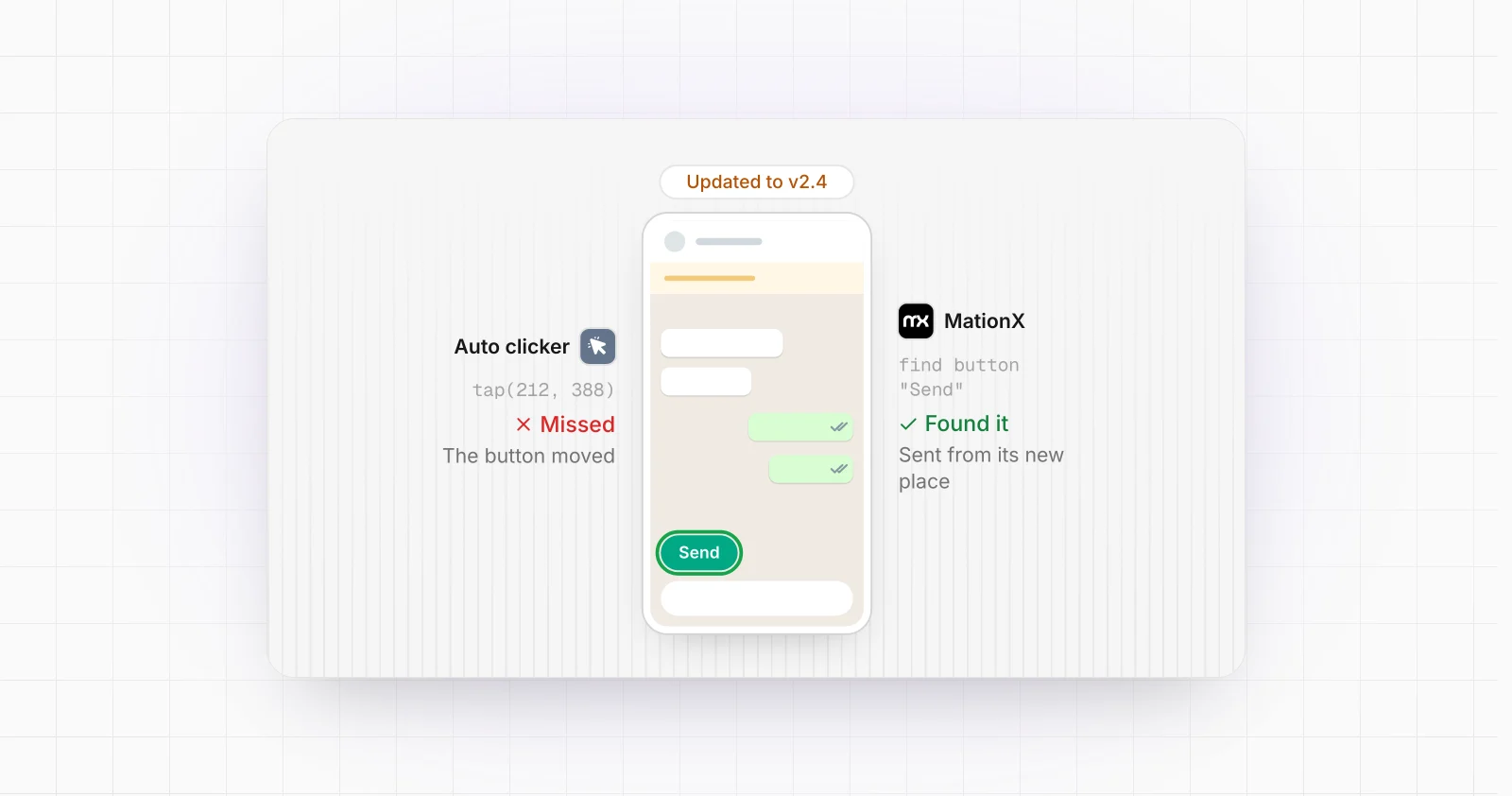
The weakest automation taps coordinates: "tap at x 540, y 1820". It works until a banner pushes the layout down by 60 pixels, and then it taps the wrong button on every phone at once. Automation that finds elements by their ID or text survives a moved button, because it looks for the button, not for a spot on the screen. That is one reason accessibility-based automation holds up better than screen recording and coordinate replay.
New screens nobody planned for
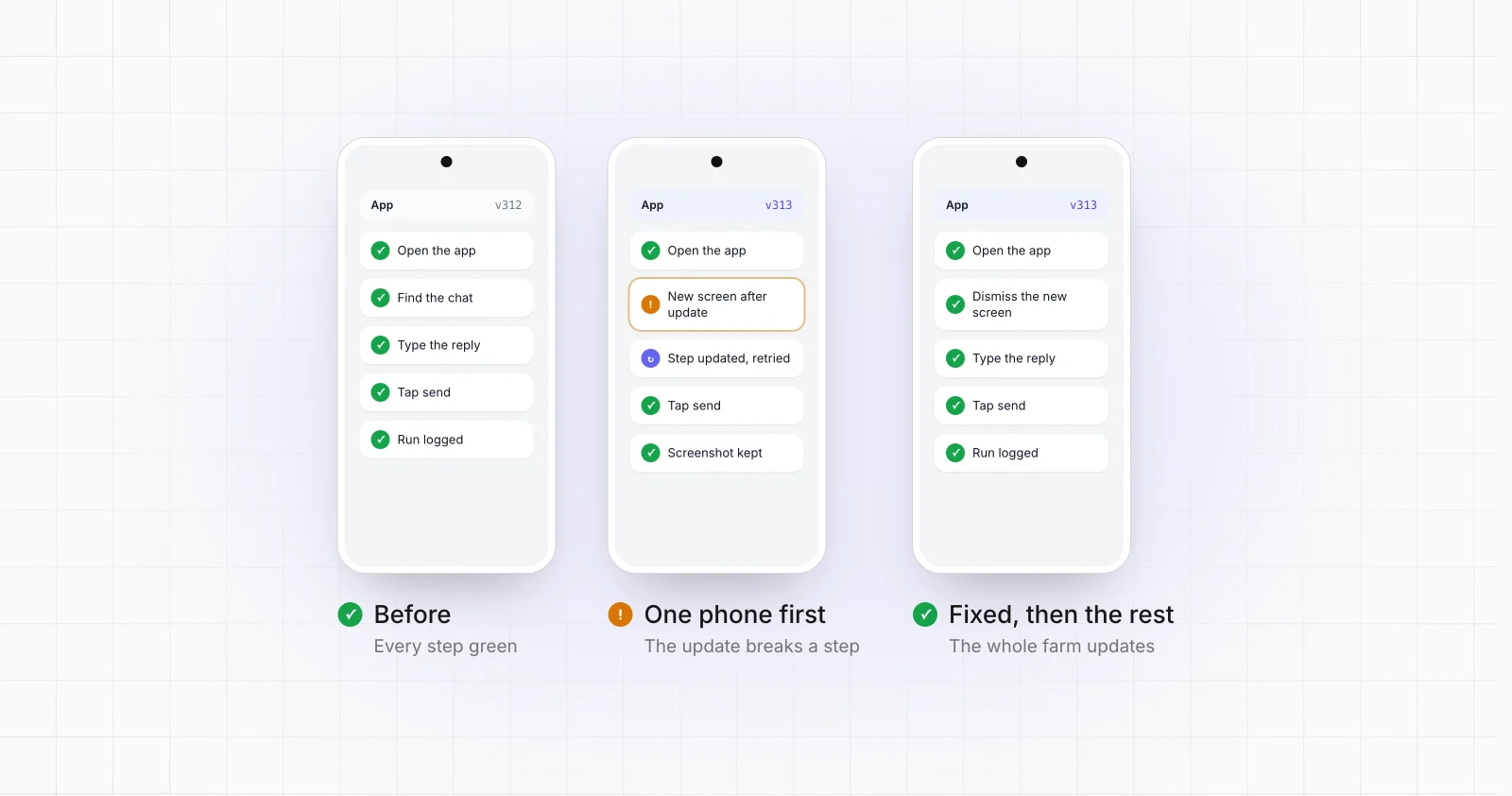
After an update, apps like to show something once: a "What's new" card, a new privacy consent, a prompt to try a feature, a request for a permission the new version needs. A flow that expects the home screen finds a dialog on top of it. If the flow does not know how to recognise and dismiss unexpected screens, it waits until it times out, on every phone that got the update.
Changed labels, and A/B tests
Large apps test new layouts and new wording on a share of their users before they ship them to everyone, often without an app update at all. Two accounts on the same app version can see a different button. A farm notices this as a flow that works on most phones and fails on a few, which is easy to mistake for a problem with those phones.
Forced updates
Google Play gives developers an "immediate" in-app update flow, a full-screen prompt that, in Google's words, requires "the user to update and restart the app in order to continue using it". When an app turns it on for an old version, every phone still on that version stops at the same screen. WhatsApp also stops working on versions that are too old and asks for an update. Freezing versions forever is therefore not an option, only deciding when to update.
A new UI toolkit
Many apps are moving their screens from Android's older view system to Jetpack Compose. In Compose, elements are not exposed to automation tools by the IDs developers use internally unless the developer turns that on: Google's documentation notes that by default composables are reachable "only by their convenient descriptors (displayed text, content description, etc.)" (Android Developers). A flow built on IDs can lose them overnight when a screen is rewritten, and has to fall back to text, descriptions and the structure of the screen.
Android updates
The phone's own system updates change things too: new permission dialogs, stricter background limits that can stop a service, and restricted settings. On Android 13 and later, some settings, accessibility among them, can be restricted when you install an app until you allow restricted settings, which matters for any automation that runs as an accessibility service on the phone.
How to keep a farm running through updates
Control when apps update
By default Google Play updates apps on its own. You can turn that off for all apps ("Don't auto-update apps") or per app ("Enable auto update" off). On a farm, turn it off and update on purpose. Two caveats: Google notes that critical security fixes can still install regardless of the setting, and developers release updates in staged rollouts to a percentage of users at a time, so phones that update on their own drift onto different versions. Updating on purpose keeps the whole fleet on one version you have tested.
Update a few phones first
Treat an update like a release: put the new version on one or two phones, run every flow on them, fix what broke, and only then update the rest. A broken flow on two phones is an hour of work. A broken flow on every phone at 3 a.m. is a lost day of activity and, for warm-up or sending, a gap the accounts' history will show.
Find elements the way a person does
Selectors that survive updates describe the element, not its position:
- Prefer stable text and descriptions ("Send", "Message") over coordinates.
- Anchor on structure when a label changes: the button next to the message field, the second item in the tab bar.
- Keep fallbacks: if the ID is gone, try the description, then the text.
- Match WebView screens by text, because they rarely carry useful IDs.
Expect the unexpected screen
Every flow should know what to do when the screen is not the one it expects: recognise the common interruptions (update prompts, consents, rating requests, "What's new"), dismiss them, and go back to the step it was on. When it meets something it has never seen, it should stop, keep a screenshot and say so, rather than tapping on blindly.
Log every step and watch the success rate
A farm that logs every step with its result and a screenshot turns "it stopped working" into "step 4 on these six phones has failed since 02:10, here is the screen". Watching the success rate per step catches an update within one run instead of one week. The warm-up and the daily activity of a farm depend on runs that actually finish, so this is where an update costs the most if nobody notices.
Decide who fixes it
The last habit is organisational: someone has to own the fixes. With farm software you run yourself, that is you, after every update of every app the farm uses. With a service that builds and runs the automation for you, it is the service. MationX logs every step on every phone, and keeping flows working after app updates is part of the monthly; see how it works.
The short version
- App updates, not hardware, are what usually stops a farm.
- Turn off automatic updates and update a few phones first.
- Find elements by what they are, not where they are.
- Teach every flow to handle screens it did not expect.
- Log every step and watch the success rate, so you see a break in hours, not days.
Running a farm and tired of fixing flows after every update? Tell us what it runs and we will tell you what keeping it running would take.